Part 1 of 1
Player guide
Turn your Sim into a numbers person: an office job, a home business, or both.
The Accountant Career adds a new skill, Money Mastery, and a CPA exam. Pass the exam and two doors open:
- The office side: the Certified Accountant career. One level, no promotions, regular hours.
- The at-home side: Personal Accountant, a side line with your own clients. Digital clients you work for from any computer, and later in-person clients you meet face to face.
You can do one, the other, or both. A Personal Accountant can keep another job at the same time.
Version 1.0 is free. It is no longer a beta.
Requirements
- The Sims 4 base game. No pack needed.
- XML Injector. Required.
- Nothing else. You don’t need Lumpinou’s Mood Pack or the Maplebell Pie Menu for this mod.
Install and update
What is in the download
One file: maplebell_AccountantCareer.package, in the ZIP Maplebell_Accountant_Career_v1.0.zip. There is no script file.
Installing
- Close the game.
- Put
maplebell_AccountantCareer.packageinDocuments/Electronic Arts/The Sims 4/Mods. - Install XML Injector if you do not have it.
- In Game Options > Other, make sure Enable Custom Content and Mods is on.
Updating from the beta
Replace the old file: delete maplebell_AccountantCareer.package and put the new one in its place. The file name is the same. Never keep two copies.
If a cycle stops after a save is loaded, a new cycle starts by itself the next time your Sim appears. Manage Client Tasks comes back without Take a Break and Resume Job.
How to use it in game
Step 1: build the Money Mastery skill
Money Mastery is a 5-level skill for teens and older. Click a computer and open the MoneyMastery menu. Most actions there raise the skill, and new ones open as it goes up.
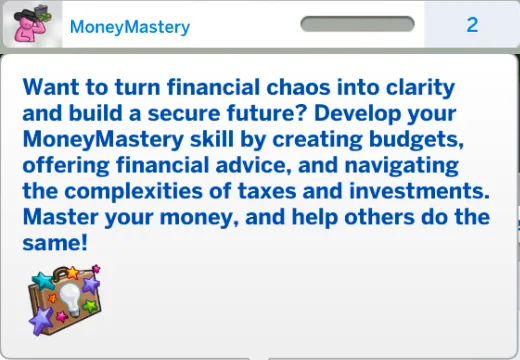
The Money Mastery skill.
| Money Mastery level | What opens |
|---|---|
| 1 | Trade Stocks, Attend Seminars |
| 2 | Analyze Stock Market Trends, Prepare Tax Documents, Study Investment Strategies, and the socials Discuss Market Trends and Money-Saving Tips |
| 3 | The social Offer Financial Advice |
A few of these, in plain words:
- Trade Stocks is a money gamble. You can win or lose. The higher your Money Mastery, the better it goes on average. You can trade once a day.
- Prepare Tax Documents earns money. It is only done when you choose it, once a day.
- After Trade Stocks or Prepare Tax Documents, the row greys out with “Already done today. Available again tomorrow.”
- Analyze Stock Market Trends gives you a reading of the market. It is for flavour. It does not change your odds.
- Financial Seminar: a phone action. It costs §350 and takes your Sim away for two days. They come back with more skill and a moodlet. You can leave early. Find it on the phone under Business > Attend Financial Seminars.
Step 2: pass the CPA exam
In the MoneyMastery menu choose Attempt Certified Public Accountant Exam. It takes four hours and costs §1,500.
- Below Money Mastery 4 the chance to pass is low (about 1 in 10).
- At Money Mastery 4 or 5 it is about 9 in 10.
- Pass and your Sim is a CPA (“Certified Success”).
- Fail and you can try again after 24 Sim hours.
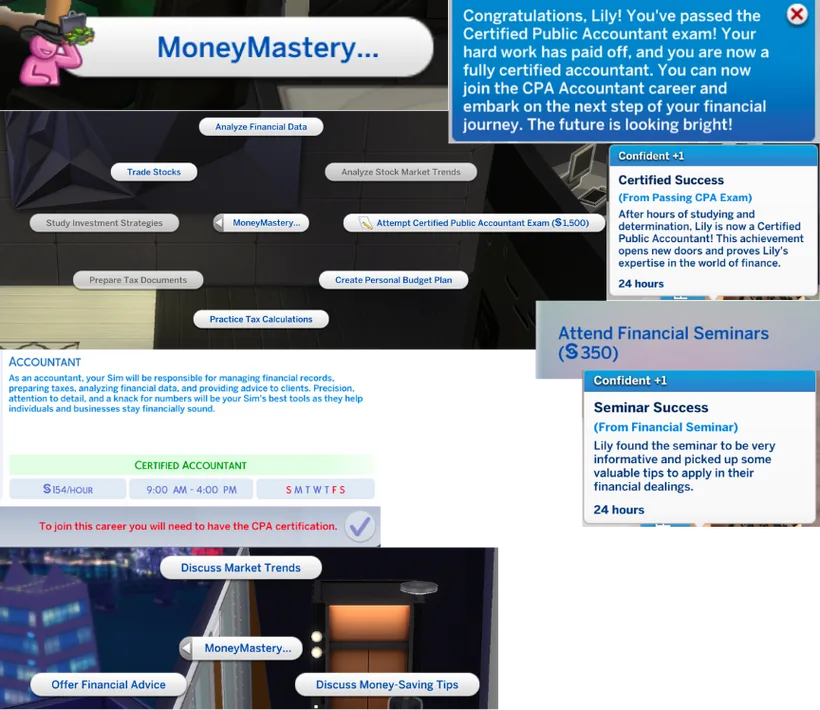
The MoneyMastery menu, passing the CPA exam, and the Accountant career.
The office side: Certified Accountant
Once your Sim is a CPA, the Certified Accountant career shows in the usual job list. It is for young adults and older.
- One level. You start doing real accounting work straight away, with no promotions to chase.
- Monday to Thursday, from 9 AM, seven hours a day. §140 an hour.
- It has daily tasks, and they count the mod’s own actions. For Manage Investments you can also use Trade Stocks.
- Take Vacation Day is on the phone, under Business.

At the office.
The at-home side: Personal Accountant
Getting your first clients
- Be a CPA.
- On a computer, open MoneyMastery > Personal Accountant and choose Offer Financial Management Services (Digital Clients).
- It does not always work. The chance is low at first and much better at Money Mastery 4 (about 9 in 10).
- When it works you get a “New Client Partnership” message. You are a Level 1 Personal Accountant and can start working right away.
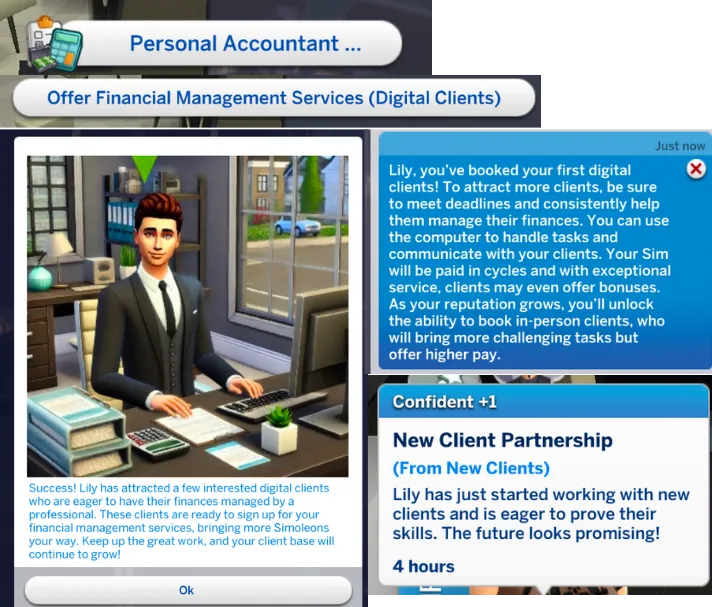
Signing your first digital clients.
Doing the work
On the computer, the Personal Accountant menu has nine tasks for your digital clients. Pick any you like. You do not have to do them all.
- Every task raises your performance for the current cycle.
- Financial Health Check (two hours) tells you how you are doing, from Poor to Exceptional. It gives a grade even before your first task, using the same grade levels as the paycheck.
Getting paid
- You are paid every 3 days.
- The more work you do in a cycle, the better you are paid. A cycle with no work pays like a low score.
- Performance starts again from zero every cycle.
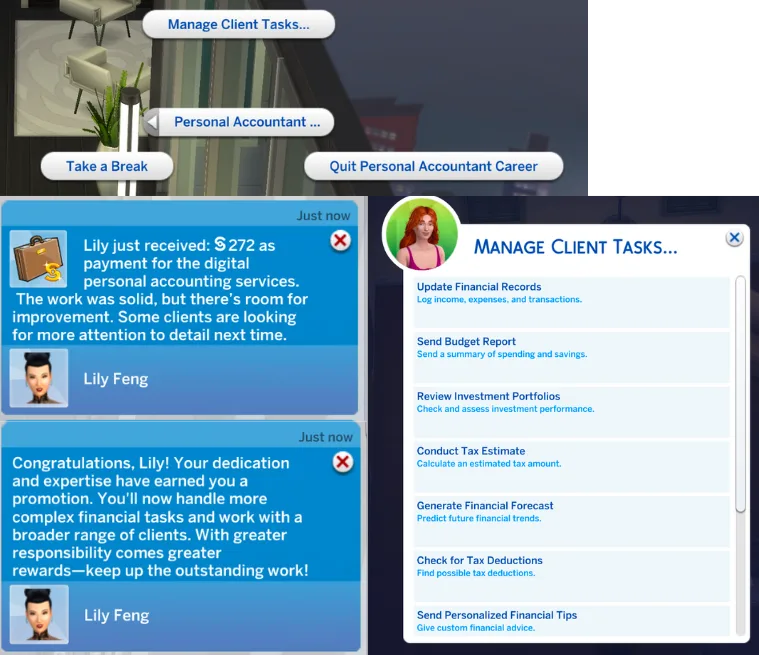
Client tasks, a payment and a promotion.
Promotions
There are five Personal Accountant levels. Your Sim can only move up a level after a cycle with more than 60 work. There are no random level jumps, and the top level is never “promoted”. Higher levels mean more pay.
In-person clients (the side line from Level 2)
From Personal Accountant Level 2, your Sim can sign clients face to face.
- Click another Sim (teen or older, someone your Sim has met).
- Open the MoneyMastery social menu and choose Offer Financial Management Services.
- If they say yes, they become your Client and you become their Personal Accountant in the relationship panel.
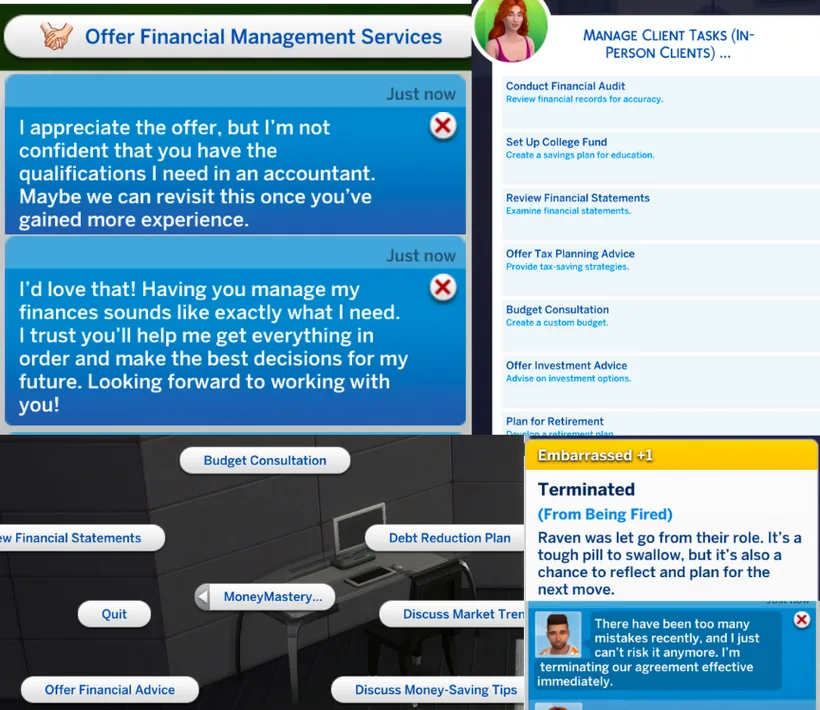
Signing in-person clients, their tasks, and a client who ends the agreement.
You can have as many clients as you like. Your digital clients still need work too, so watch the workload.
Working for in-person clients
- In person, with socials on your client: Review Financial Statements, Budget Consultation (a choice card) and Debt Reduction Plan.
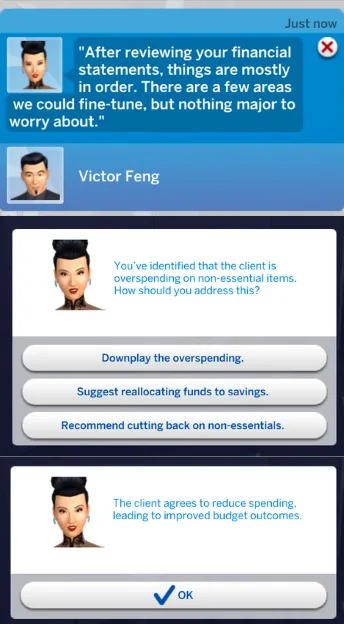
A Budget Consultation choice card.
- On the computer: Manage Client Tasks (In-Person Clients).
In-person work and digital work are counted separately. One does not affect the other’s pay. In-person work is also paid every 3 days.
A client can fire your Sim, and your Sim can stop working for a client.
Take a Break, Resume, Quit
All three are on the computer: MoneyMastery > Personal Accountant, as Take a Break, Resume Job and Quit Personal Accountant Career.
- Take a Break: for as long as you like. The cycle you are in finishes and pays once. After that, no pay until you come back. Your Sim gets the Taking a Break moodlet.
- Resume Job: your digital clients come back, and a new 3-day cycle starts. Your in-person clients come back too if your Sim is Level 2 or higher and still has at least one client. A client signed while your Sim is on a break does not start a paid cycle. The cycle starts after Resume Job.
- Quit Personal Accountant Career: takes effect at once and ends the digital and in-person sides together. Quitting mid-cycle pays nothing for that cycle, and a note tells you so. You can come back any time, but you start again from Level 1. Quitting during a break works too.
What’s new in 1.0 (12 November 2026)
This is the first version out of beta. Changes since the last public file (the 2024 beta, maplebell_AccountantCareer.package).
Pictures
- Select a Career now shows the career’s own picture instead of the llama.
- Both Manage Client Tasks lists, Digital Clients and In-Person Clients, now have a picture on every row. In the in-person list, Set Up College Fund shows a mortarboard, Offer Investment Advice a silver Simoleon coin and Plan for Retirement a gold Simoleon.
- Every row picture on both Manage Client Tasks lists and the Money Mastery skill-bar picture (now a laptop) are base-game pictures. No pack is needed for them.
Pay and cycles
- Digital clients now pay every 3 days instead of every 6, the same as in-person clients.
- In-person work is now paid from the in-person pay table. It used to be paid from the digital one.
- The in-person paycheck message now shows the amount.
- A cycle with no work done now pays like a low score. It used to be able to pay any band.
- Your Sim is only promoted after a cycle with more than 60 work. Random level jumps are gone, and the top level is never “promoted”.
- The Level 3 to 4 promotion now shows as a note like the other promotions.
- If a cycle stops after a save is loaded, a new cycle starts by itself the next time your Sim appears. Manage Client Tasks comes back without Take a Break and Resume Job.
Quit, Take a Break and Resume Job
- Quit now takes effect at once. It ends both the digital and the in-person clients.
- Quitting mid-cycle pays nothing for that cycle, and a note now says so: “You quit mid-cycle. No pay for the unfinished cycle.”
- Quitting and offering services again no longer pays a loop.
- Quit now shows while your Sim is on a break or has only in-person clients. Quitting on a break no longer blocks the career afterwards.
- Take a Break no longer pays at once and can no longer be repeated for money. The running cycle pays once at its end, then nothing until Resume Job.
- Take a Break now gives the “Taking a Break” moodlet. Resume Job and Quit remove it.
- A client signed while your Sim is on a break no longer starts a paid cycle. The cycle starts after Resume Job.
- Resume Job now brings back in-person clients if your Sim is Level 2 or higher and still has at least one client.
Computer work
- Trade Stocks and Prepare Tax Documents can each be done once a day. When used, the row greys out with “Already done today. Available again tomorrow.”
- Prepare Tax Documents can no longer lose §5,000 to §10,000.
- Break-even trades and tax filings now show a plain note instead of nothing.
- Prepare Tax Documents is no longer done by free will.
- Update Financial Records now counts toward your digital client work.
- The Manage Investments task now says “Review Investment Portfolios or Trade Stocks”. Either one completes it.
- The career’s daily tasks now count the right computer actions.
- Financial Health Check now gives a grade before the first task. It uses the same grade levels as the paycheck.
Clients and chats
- Debt Reduction Plan (the chat) now counts toward in-person client work.
- Budget Consultation’s bad choice now loses points.
- Review Financial Statements goes badly about one time in five, with a worried reply and no points.
- The Financial Audit texts now fit how well the work went.
- Review Financial Statements, Budget Consultation and Debt Reduction Plan only show while your Sim is a working Personal Accountant who is not on a break.
- The client chats, and Discuss Market Trends, Discuss Money-Saving Tips and Offer Financial Advice, no longer show on children.
- Quit Personal Accountant Career, Take a Break, Resume Job, Offer Financial Management Services (Digital Clients) and Trade Stocks are no longer done by free will.
- “Leave the seminar early” now has its Yes and No buttons. They were blank.
Text
- Paycheck and Financial Health Check lines now say “this cycle” instead of “this week”.
- The in-person row “Financial Health Checkup” is now “Assess Overall Finances”, so it no longer looks like the digital Financial Health Check.
- The offer note says “you’ve booked new digital clients!” instead of “your first”.
- The CPA exam texts now name the Accountant career and say you can retry tomorrow.
- “Study Investments Strategies” now reads “Study Investment Strategies”.
- Offer Investment Advice no longer shows the reply about losing it all on a bad stock pick.
- Players using another game language now see English text instead of blank entries.
Good to know
- In-person clients start at Level 2.
- Quitting while a cycle is running pays nothing for that cycle. The game shows a note when that happens.
Known limits
- A paycheck from another level. About 1 paycheck in 26 uses a different level’s pay.
- The in-person offer bonus. The better chance of signing an in-person client counts only at Personal Accountant Level 5.
- Old clients after Quit. Quitting doesn’t end your Sim’s ties with old in-person clients. After starting again, they can’t be offered services a second time, but from Level 2 they count as your clients again on their own.
- Playing another household. If a pay cycle ends while your accountant is not on the active lot, it may stop without pay. A new cycle then starts by itself the next time your Sim appears.
- English text. All 18 game languages show the English text for now.
Troubleshooting and FAQ
I cannot find the MoneyMastery menu. It is on computers. Check the package and XML Injector are installed and custom content is on.
I cannot find the Certified Accountant career. Your Sim must pass the CPA exam first. The career is for young adults and older.
I keep failing the CPA exam. Raise Money Mastery to level 4. The chance to pass jumps from about 1 in 10 to about 9 in 10. You can retry after 24 Sim hours.
Offer Financial Management Services keeps failing. It is a chance roll. At Money Mastery 4 it works about 9 times in 10.
I cannot offer my services to other Sims. In-person clients open at Personal Accountant Level 2. The other Sim must be a teen or older, someone you have met, and not already your client.
My paycheck was tiny. Pay follows how much work you did in that 3-day cycle. Use Financial Health Check to see where you stand.
I am not getting paid any more. Are you on a break? Choose Resume Job.
Can my Sim keep another job? Yes. The Personal Accountant side line runs alongside any other career. The Certified Accountant career is a normal job, so it takes your Sim’s job slot. Your Sim can run the Personal Accountant side line and the Certified Accountant career at the same time.
Can children use it? Money Mastery is for teens and older. The career is for young adults and older. Children cannot be clients.
Do I have to do every task? No. Pick what you like. More work means better pay and a better chance of promotion.
If something else goes wrong, tell me what happened, what you expected, and your Money Mastery and Personal Accountant levels.