Part 1 of 1
Player guide
One small shared file that gives several mods their own folder on the phone.
The Pie Menu adds one folder to your Sim’s phone: MB Menu. It does nothing on its own. Other mods put their phone actions inside it, so they are easy to find.
The current file is maplebell_piemenu.package.
Which mods use it
- Actor Overhaul (for example, Schedule Meeting With Agent)
- Expanded Storytelling Relationship Bits
- Senior Trip
- Teen Stories & Activities
If you play any of these, you need the Pie Menu.
Requirements
None. It is a single base-game file with no script, and it doesn’t need XML Injector.
Install and update
The file is maplebell_piemenu.package.
- Close the game.
- Put
maplebell_piemenu.packageinDocuments/Electronic Arts/The Sims 4/Mods.
You only need one copy, however many of the mods above you use. If it came with another mod’s download and you already have it, you do not need to add it again.
Updating: delete the old maplebell_piemenu.package and put the new one in its place. Do not keep the old one next to the new one.
How to use it in game
Open your Sim’s phone. Look for the MB Menu folder. Open it to find the phone actions of the mods above.
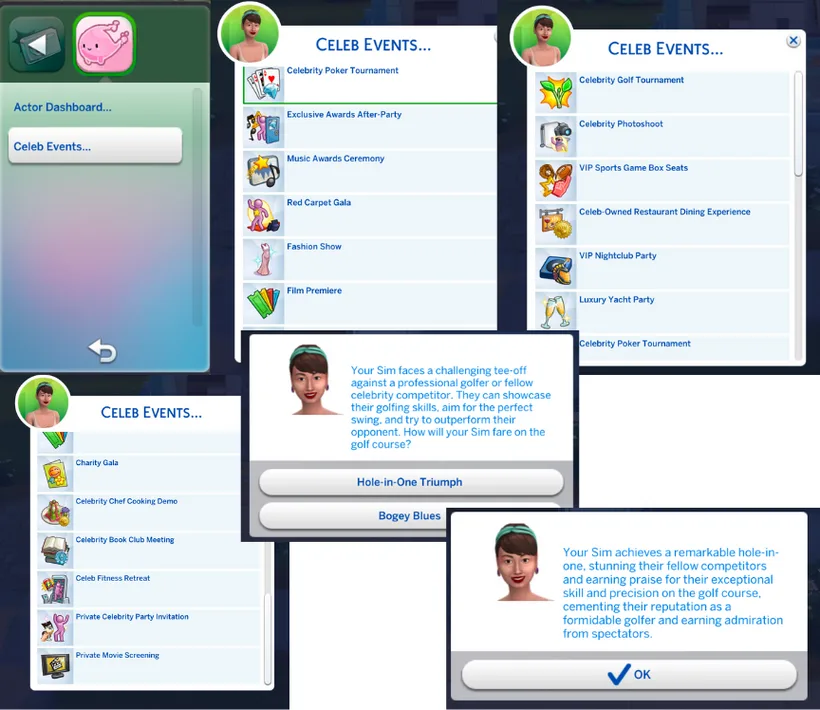
The MB Menu on the phone, here with Actor Overhaul’s Celeb Events.
Known limits
None found.
Troubleshooting and FAQ
I cannot see MB Menu on the phone.
Check that maplebell_piemenu.package is in your Mods folder and that custom content is on in Game Options > Other.
A mod’s phone action is missing. Check that the Pie Menu is installed, and only once. Without it, those actions have no MB Menu folder to sit in.
I have two copies. Is that a problem? Keep one. Delete the older copy.
Does it work on its own? It only adds the folder. You will not see anything new unless you also have a mod that uses it.